
After the first week of the learning project I have found a free editing software that is easy to use and that I enjoy. This software is called DaVinci Resolve 16 and it has a multitube of features. An example of the features that it has is that the free version offers video exporting up to 4k resolution. If I wanted to get to 8k resolution, I’d have to pay for the premium version, but I won’t even be using the 4k feature of this program. The only downside to this program is that not everyone can use it. To be able to use it, you need to have a computer with a graphics card and windows 10. It is, however, available on mac and I’d be curious to know if it has any restrictions for the type of mac or version of ios.
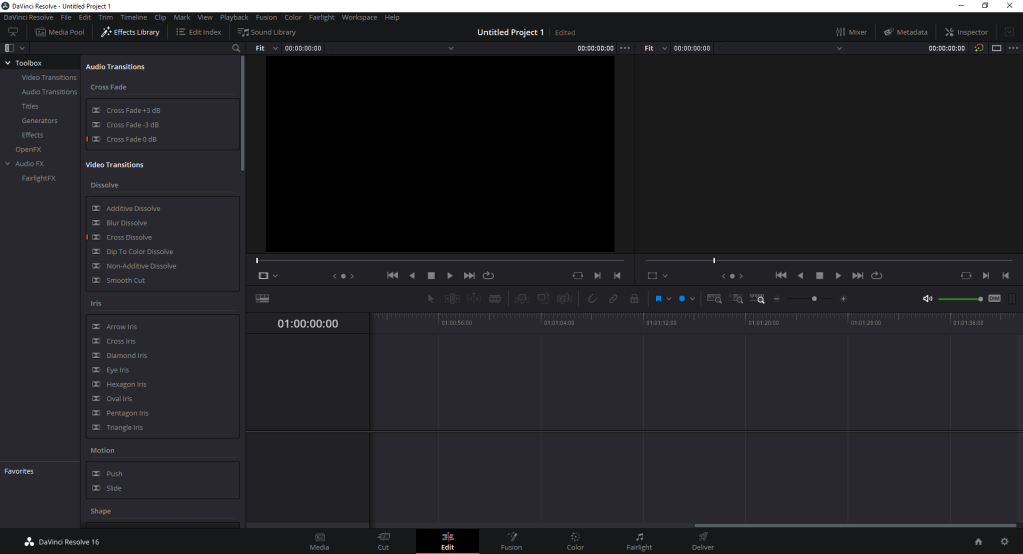
This week I decided that I’d familiarize myself with some of the options the software has. For example, I became familiar with the trim tool and how to trim single clips to make an entire video from one clip. This took me a while and I needed to go on Youtube to find a video that would help me. Once I figured this out, it made everything a whole lot easier. I then decided that I’d try to figure out transitions to see if I could seamlessly add transitions that weren’t too out there. This was also fairly easy because there is a tab of transitions and you can just drag and drop the transition that you’d like to use onto the end of the clip that you want it to begin at. I haven’t made a full video yet, but by next week I might have a finished product up on my blog for everyone to see. I’m very excited to see how it ends up looking. The video will probably just be a vlog of my week. I will keep looking at the features and keep you all posted.

 Jesse's Blog